
TronIDE (在线合约开发工具)
TronIDE 是一款在线智能合约编辑器,采用模块化架构,以插件形式提供智能合约的编辑、编译和部署功能。
前置阅读
TronIDE 智能合约开发流程
TronIDE 是面向 TRON 智能合约开发的网页端集成开发环境(IDE)。它采用模块化架构,以插件形式提供智能合约的代码编辑、编译、部署和链上交互功能。
本文演示如何用 TronIDE 编写、编译 HelloWorld 智能合约,并把它部署到 TRON Shasta 测试网。
使用 TronIDE 部署 HelloWorld
TronIDE 专为 TRON 生态的智能合约设计,无需安装本地开发环境,在浏览器中打开 tronide.io 即可使用。
1. 安装并配置 TronLink 浏览器插件
TronIDE 通过 TronLink 钱包与 TRON 账户交互并签名交易,配置步骤如下:
- 在 Chrome 或兼容浏览器中安装 TronLink 扩展程序。
- 创建新钱包、导入现有钱包私钥,或连接硬件钱包,准备开发账户。
- 测试网部署可通过水龙头免费领取测试所需的 TRX。
- 在 TronLink 插件中把当前网络切换到目标测试网(如 Shasta 或 Nile)。
2. 编写 HelloWorld 智能合约
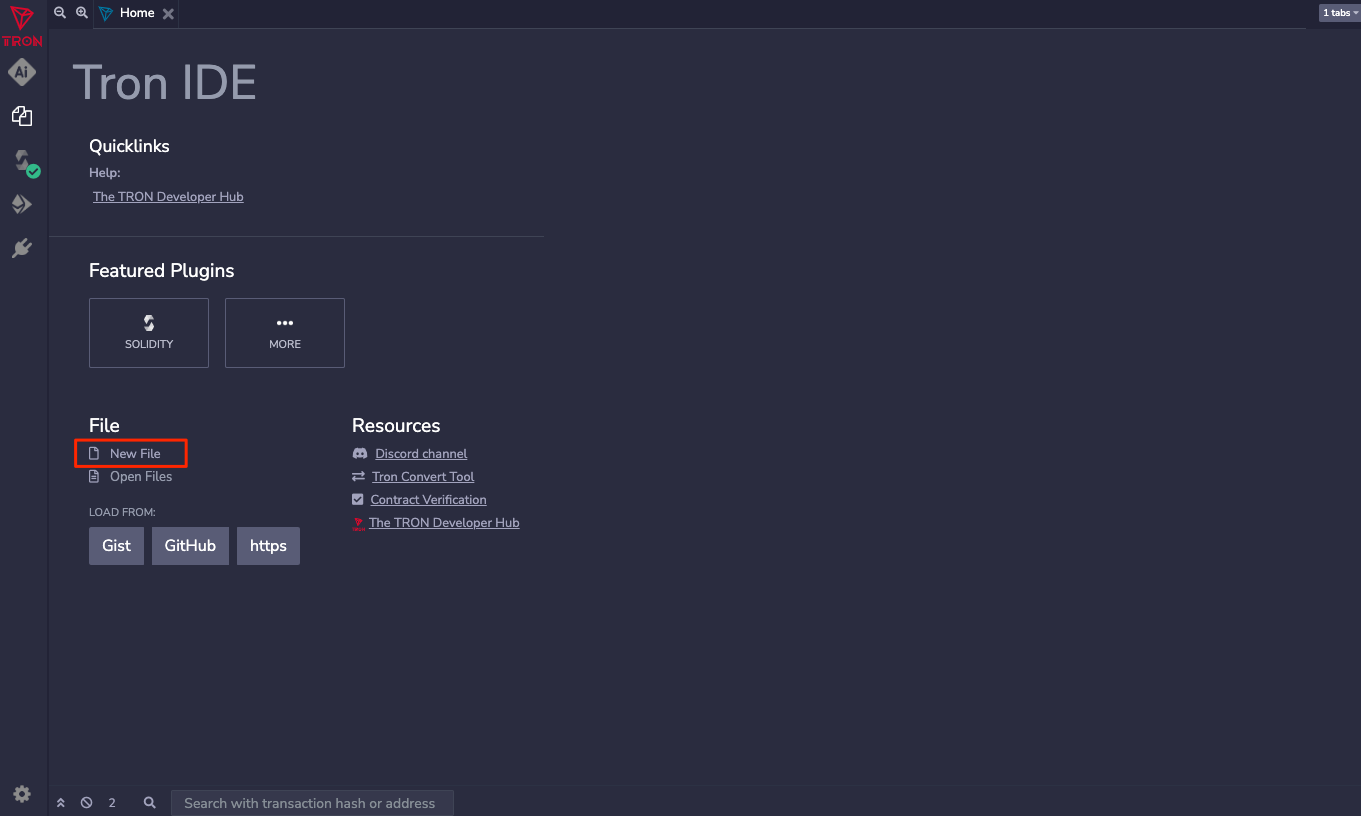
点击 TronIDE 文件浏览器区域的 New File 按钮,新建合约文件并命名为 HelloWorld.sol:
把以下 Solidity 示例代码粘贴到新建的 HelloWorld.sol 文件中:
// 锁定 Solidity 编译器版本为 0.5.10,避免因编译器小版本升级导致微弱的行为差异
pragma solidity 0.5.10;

// 合约是部署在区块链特定地址上的函数和状态数据的集合
contract HelloWorld {

    // 使用 public 关键字修饰的状态变量可直接从合约外部被查询,编译器会自动为其生成 Getter 方法
    string public message;

    // 仅在合约部署创建时执行一次的构造函数
    constructor(string memory initMessage) public {
        // 接收初始字符串并将其持久化存储在 message 状态变量中
        message = initMessage;
    }

    // 一个公开的可调用方法,用于更新合约内的 message 数据
    function update(string memory newMessage) public {
        message = newMessage;
    }
}
3. 编译合约
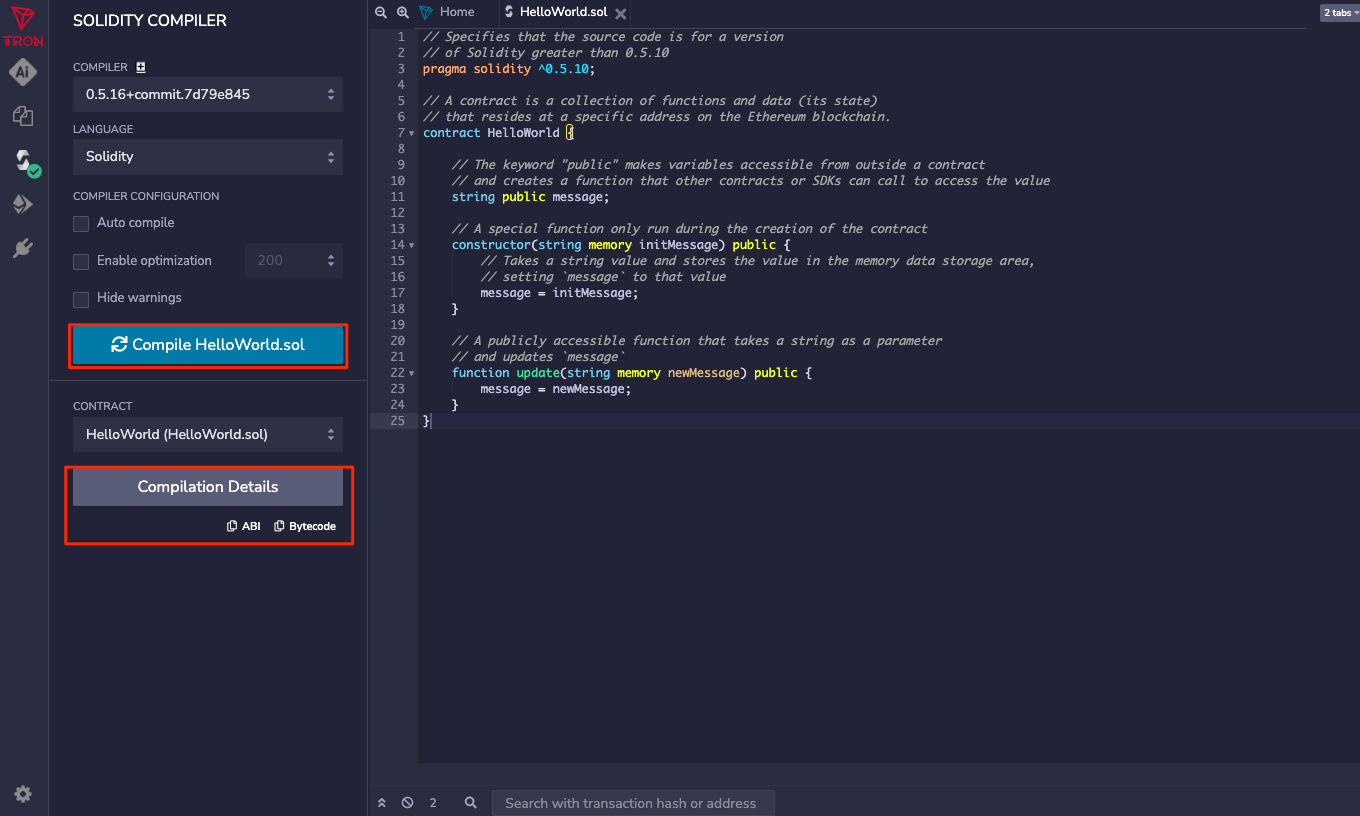
在左侧侧边栏中打开 SOLIDITY COMPILER 插件,选择与合约声明完全匹配的编译器版本 0.5.10,然后点击编译按钮。
- 编译成功:插件将返回合约的 ABI 定义与 Bytecode 字节码。
- 编译失败:底部的日志区域会以红色高亮显示详细的语法或编译报错信息。
4. 部署合约
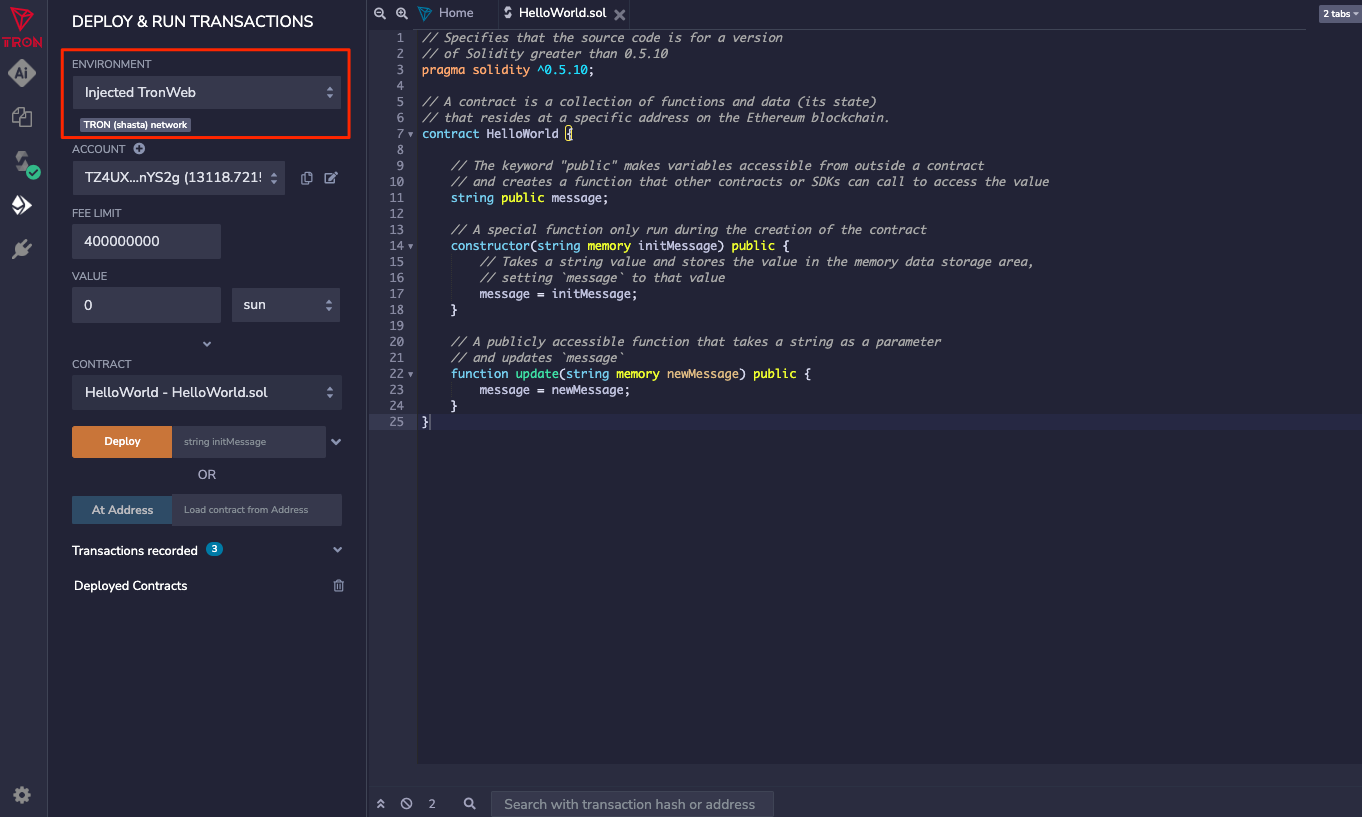
编译通过后,切换到 DEPLOYMENT(部署)插件面板,准备把 HelloWorld 合约部署到 TRON Shasta 测试网:
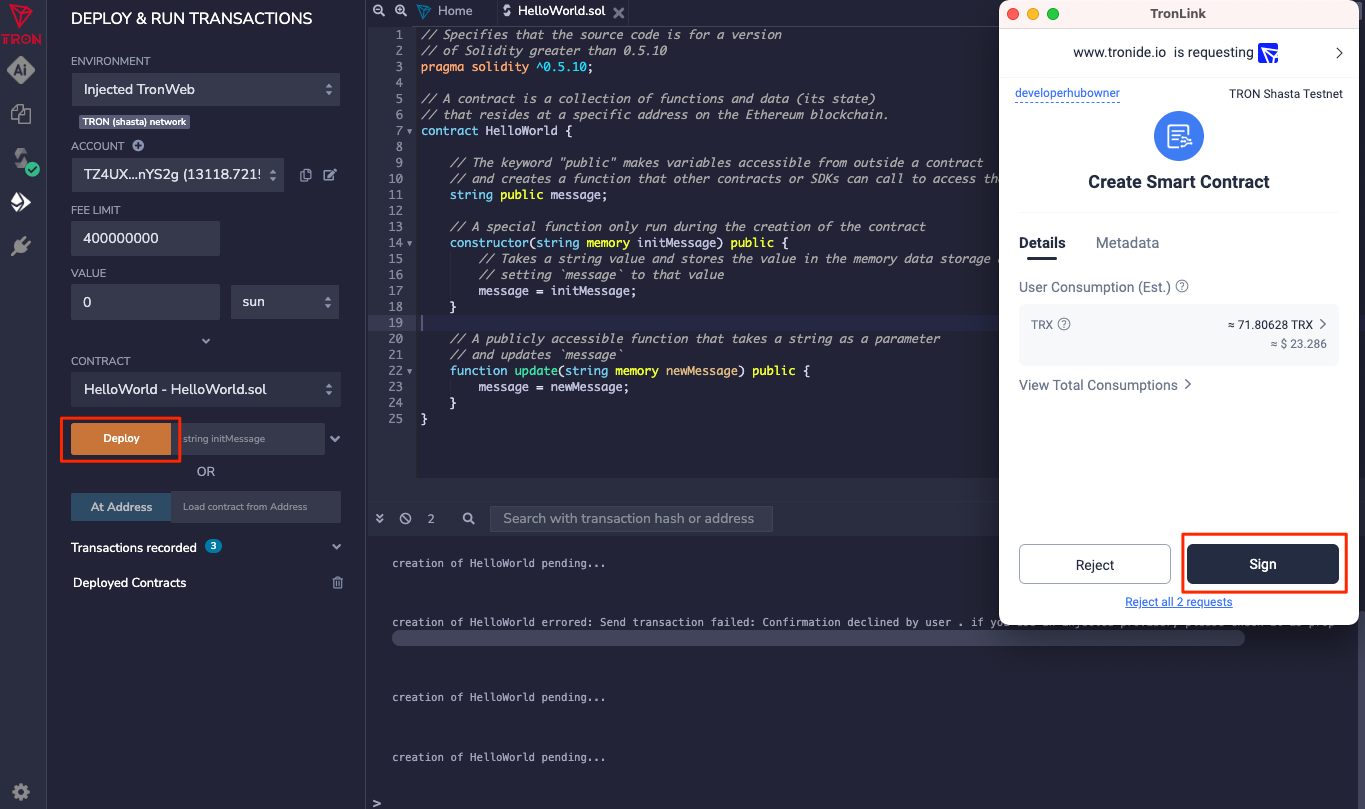
在 TronIDE 面板中点击 “Deploy” 按钮后,已连接的 TronLink 钱包会弹出创建智能合约的签名确认窗口;核对参数后点击接受(Sign)签名。
部署交易被节点打包确认后,TronIDE 的终端(Terminal)区域将打印出本次部署交易的详细回执信息。
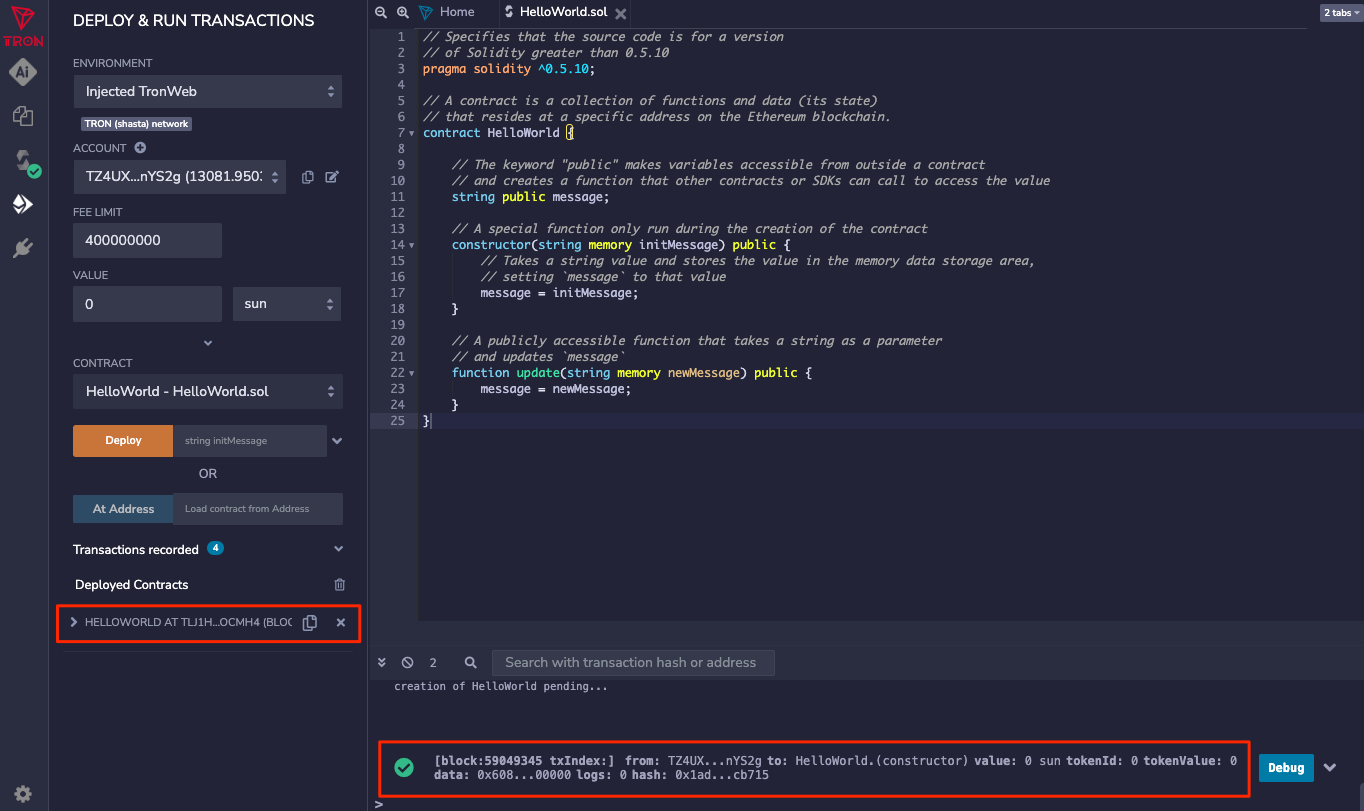
至此,HelloWorld 智能合约已部署到 TRON 网络。复制合约地址,在 Shasta 测试网区块浏览器中搜索并查验部署状态;也可以直接在 TronIDE 的已部署合约面板中调用 message 和 update 方法与合约交互。
相关资源
- TronIDE GitHub 开源仓库 —— 查看源码、版本变更和问题反馈
- 通过 gRPC 调用 TRON —— 了解如何使用现代高性能的 gRPC 框架直接调用节点接口
Updated about 1 month ago